Mixed media index cards – 3 June 2016

AngelaPorter_3June2017_MixedMediaIndexCard1

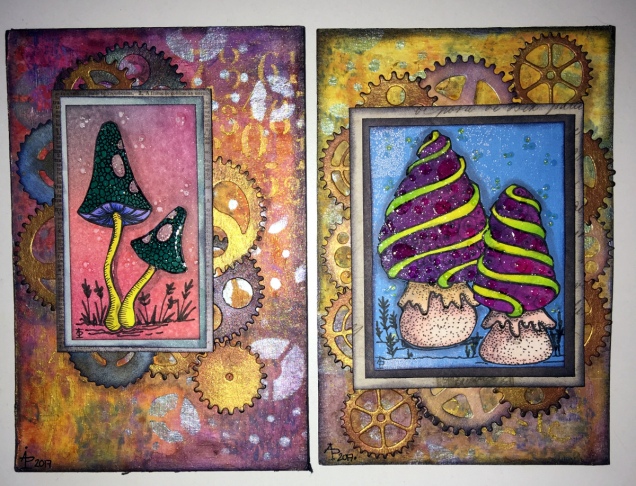
Two more index card done!

I drew the fungi then coloured them with the Chameleon Color Tones and Color Tops pens.  Cogs have appeared in the background once again – gotta have a lil bit of steampunkishness!

I’ve used 3D Crystal Lacquer on the fungi caps and on the stars in the background.

I’m liking the slightly bigger format of the index cards compared to ATCs.

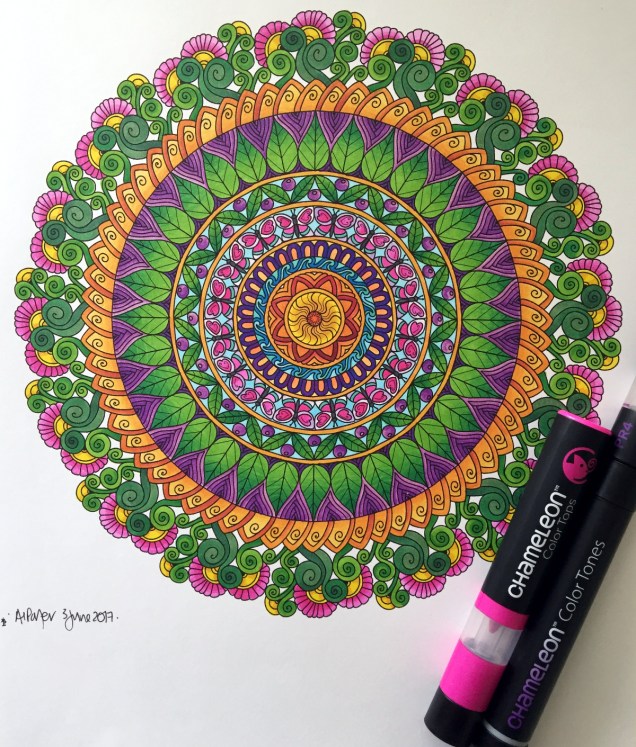
Chameleon Color Tones, Color Tops and a Coloured Mandala

SixColoured_AngelaPorter_3June2017

Yesterday, I recieved a big box filled with goodies – a full set of the Chameleon Color Tops to go with my Chameleon Color Tones markers, as well as a full set of ink refils for them

I couldn’t wait to try them out, and did on a couple of small fungi I’d drawn, which you’ll see in another blog post as I want to use them on some mixed media index cards.  I loved using them, and so wanted to do something a bit bigger, and the mandala above was the result.

What I love is the ability to create smooth gradations between one colour and another, with out the fuss of using two color tone pens to achieve this.  Of course, I still love the original colourless to full colour color gradation, and have used this in the mandala on parts of the butterflies.

However, I love strong, bright colours, and the Chameleon Color Tops are fab for doing this!

Now, I do have a full set of Copic Ciao markers, which are great.  However, achieving a smooth colour blend is quite difficult, especially with colours that are far apart in intensity or colour.  You can use the tip to tip method of transferring colour from one pen to another and use the pen to blend the colour a bit better, but I still struggle, even on specialist marker paper.

Not any more!

What I haven’t done is to look at how the pens blend when the colours are from different colour groups, such as blending a green to a red, but you can guarantee I’m going to try them out.  Apart from them maybe creating some mud where the colours overlap (which would happen anyway), I have confidence they’ll do this just fine and dandy.

Yesterday’s Mixed Media Index Cards – update

AngelaPorter_1June2017_MixedMediaIndexCard4

I spent some time yesterday and this morning adding some details to drawing on each of the index cards.

I added stippling and lines to add shading on the focal points, both in black and white.

I also added some ground for them so they weren’t floating in air; the grasses or plants in the background I wanted as black silhouettes just so interest/texture/pattern was added.

Finally, I added either white dots or black ‘popping bubbles’ to the ‘sky’ for more visual interest.

I’m now much happier with them and feel that they are complete.

Mixed media index cards

AngelaPorter_1June2017_MixedMediaIndexCard3

I started these 5″x 6″ cards yesterday and finished them (I think) this morning.

The focal images I drew myself on watercolour card.  I used Caran D’Ache Supracolour watercolour pencils and a damp brush to colour them.  I was quite happy with the colouring; I do find pencils a lot easier to use than traditional watercolours.

Nex, I cut three of them out around their edges and used a black marker to colour the white edges (and disguise my poor cutting out skills).  I had to use a craft knife in a couple of places.  The other two I cut out as small panels.

The drawings are a little bare of detail, mabye, but I can go back and add detail once I’ve decided what I’d like to do.

I’m not all that happy about the torn paper behind the focal images; you try things out and learn, maybe.  The torn paper is Gelli printed tracing paper made using PaperArtsy Fresco paints.  I then ran them through my Sizzix Big Shot in various embossing folders, and on some the embossed images have had some metallic waxes gently brushed over them. I also added some Inktense to the papers to darken the edges and add shadows.

What I am really happy with are the index cards themselves.

I started by covering them with gesso.  Then, I used some foliage stamps from IndigoBlu with grey Archival Ink by Ranger to add patterns.  I really liked this, as the patterns were softer and already ‘ghostly’ in the background, a much better choice than black Archival.

My next step was to add colour using ink blending sponges and Distress Oxide inks, followed by a spray of Gold perfect pearls mixed with water.

This is where there was an unexpected effect – the wet Distress Oxides were repelled from the Archival ink.  I loved the result, as well as the way the colours mixed as they pooled around the stamped patterns.

Here’s a close up where you can see how the Archival Ink has repelled the Distress Oxide inks:

AngelaPorter_1June2017_MixedMediaIndexCard1

Then, I used Versamark Ink to stamp more foliage on some of the cards, and mini-mandala type patterns on others.  I then sprinked WOW Embossing powder (clear holographic) over the ink then melted it with a heat tool.  This added an extra layer of interest – a subtle layer as it can only be seen from certain angles.

I framed the cards using black Archival ink and a foam blending tool to give a distressed looking edge.

Then, it was just assembly of the focal points and so on, before sticking the index cards to some really thick card to get them nice and flat; the cards are so thin that they curl a lot when working on them, even with the layer of gesso to seal the card in.  Cosmic Shimmer’s Specialist Acrylic Glue worked beautifully for this.

I had intended to make more ACEO cards, but I drew the focal images a tad too big for that format, so thought I’d try out an index card instead.  I quite enjoyed working on the slightly larger scale.

Today’s mixed media ACEOs/ATCs

ACEOs_30May2017_AngelaPorter

Today’s ACEOs/ATCs

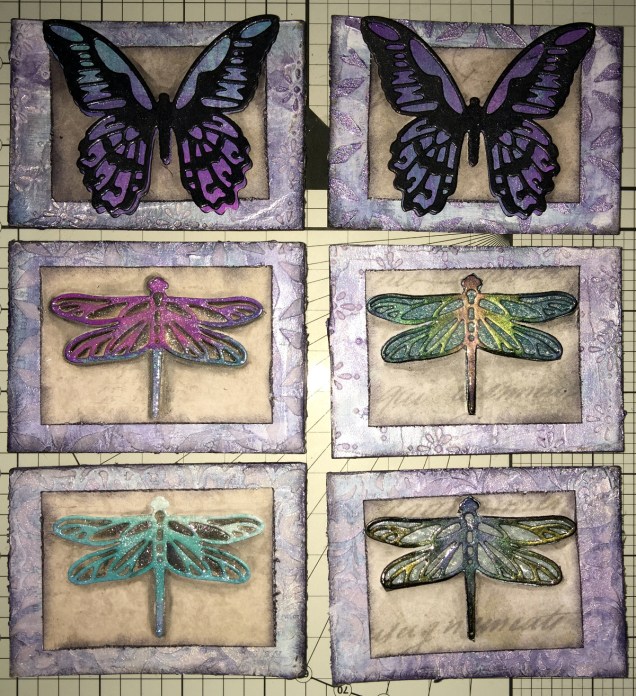
Today I’ve created a set of six ACEO/ATC cards using dragonflies and butterflies as focal images.

The photograph doesn’t do them much justice; the backgrounds are shiny purple and silver with some stenciled patterns created using modelling paste.  Peeking through in places are patterns from some reprints of first series Ordnance Survey maps as well as some torn text from an old mathematics text book.

I couldn’t work out how to use my cogs and gears on these, but remembered all the patterned paper I have, so I had a bit of a furtle through  and found some paper that looked nice against the busy background, which also the focal images looked good on.  Indeed, they look like mounted specimens.

I got the focal images from my stash, already painted.  However, I did put some painted and embossed papers behind the wings of two of the dragonflies, which looks quite nice.  I did add a wash of iridescent medium to all the focal images (can’t avoid adding some sparkle).

On returning from an appointment, I decided I would cover the dragonflies with 3D Crystal Lacquer, which has worked out really well I think (difficult to photograph though).

I’m really quite pleased with these ACEOs/ATCs; they’re simple, yet they just work and satisfy my need for ornate, sparkle and shine.  I’m glad I used the patterned paper to crated a calmer centre to mount the focal images on.

I don’t think I’m going to add any words/quotes to these, though a few gems or similar may be in order once the crystal lacquer has fully dried.

Drawing focal images

One thing I thought of as I was using the die cuts for focal images, is that I do need to find the confidence/courage to draw my own.  I have done some fungi, flowers and ammonites, but haven’t printed them out at the right size, yet.

Also, it may be that using the surface to do drawings for this may not be the best way for me to work; my drawings do tend to turn out a little too ‘perfect’ for my liking in some ways.  I’m still doing my best to work out how I can get my Surface Book to work for me as I’d like it too.  However, if I don’t use the smoothing tools in the software, the pen wobble just is totally annoying (it’s also something that is inherent in the Surface Pen/Surface book, which I really hope Microsoft will do something about sooner rather than later.

It’s really easy to use dies to cut out images for use, but to create my own…well…but we’ll see if I manage to use my own drawings in the next batch of ACEOs/ATCs.

So, my job this evening (apart from going out to do some food shopping) is to do some drawings, on watercolour paper I think, to cut out and use as focal images.

Oh, using scissors is a bit of an issue for me.  Despite me being right handed with pens and so on, I use scissors in my left hand.  In fact, there are quite a few things I can do with either hand, and many things I’m equally as bad at with either hand, such as using a badminton racquet or golf club!  Don’t ask.  Anyway, back to the scissors.  I’ve always struggled using scissors well, and I’m worse with left-handed scissors than I am with right-handed scissors.  Craft knives and me tend to be a slightly dangerous pairing – for me, not for anyone else!  I’m ok if I’m using a rule to cut straight lines, but anything else, well …

So, I will persevere, and perhaps the mistakes I make won’t be as noticeable to myself…

Mixed Media ACEOs/ATCs of today

ACEOs_1_29May2017_AngelaPorterACEOs_2_29May2017_AngelaPorter

This morning, I woke way too early and couldn’t get back to sleep, so I decided to do some more ACEOs/ATCs – two sets of four this time!

Mixed Media ACEOs, and updates

ACEOs_28May2017_AngelaPorter

Mixed Media ACEOs/ATCs

I’ve spent the last four or five hours creating this set of four ACEO/ATC cards.  It’s been a while since I did any mixed media work, but I felt the need to get a bit messy.

Each card measures 2½” x 3½” (approx. 6.5 cm x 9 cm) with the substrate being some fairly thick Kraft card.

I started by using some yellow Frog Tape to hold the cards together so I could make the background at the same time.

I started by applying PaperArtsy Fresco Paints to the kraft card until I had a finish I liked.  The colours I used were Cheesecake, Rose and Sherbet.

The next step was to add some Windsor and Newton Modelling Paste through a couple of stencils (one was the dot fade stencil by Tim Holtz, the other a mini dragonfly stencil by Creative Expressions).

Once the modelling paste was dried, which I hurried along using a Tim Holtz Heat Tool from Ranger, I watered down some Alchemy Waxes from Imagination Crafts  (white gold, tulip and apple green)and used a paintbrush to colour the dragonflies.  I then used the wax and a piece of Cut and Dry Foam from Ranger to apply some of the waxes over the dot patterns.

Once I’d finished applying the wax, I wasn’t happy with the result on the dragonflies, so I used Daler Rowney System 3 acrylic paint in Rich Gold to re-colour them. I was much happer with the results, especially the dragonflies that I’d coloured pink/red.

The next step was to have a furtle through various coloured diecuts I have in my stash.  Every now and again, I spend a day cutting out various die cuts (mainly cogs, flowers and foliage, but sometimes other things too) and then colouring them to add to my stash.  It saves on time when I have the urge to do some mixed media work. It also makes use of my rare urges to do die cutting, which I find a very tedious process.

After a good furtle, I found some cogs that would work on two ACEOs that had just the dots on the background. I couldn’t find anything I’d want to add to the dragonflies; I was just happy with them as they were.

The die cuts were applied with Cosmic Shimmer Acrylic Glue from Creative Expressions, then some Vintage Photo Distress Oxide Ink with a wet brush was used to add shadows.

I used a Quickie Glue pen from Sakura and Gold Superfine Embossing Powder from WOW to add some gold dots and to areas where there was no embossing paste.  Following this, I edged the cards using a piece of Cut and Dry foam and black Archival Ink from Ranger.


I then chose some words from the Tim Holtz Chit Chat stickers and glued them down with the Cosmic Shimmer Acrylic glue, and used a damp brush and a China Black Inktense pencil from Derwent to add shadows around the stickers.

The very final step was to add some sparkly gems, and they were done!  Once all is dry, I can add my information to the back and so on, and I have some ACEO cards to use on other mixed media projects or in my art journal.

Other arty news

Over the past week I’ve been keeping myself artfully busy learning a bit more about Autodesk Sketchbook Pro and how it works for me; you could say I’m building up a relationship with it.

For now, I’ve been drawing LOTS of mandalas!  I’m keeping them back from t’internet as I hope to publish them (some are already spoken for by the Colorist app), and other people asked if I was going to make some available for purchase.  So, I’m building up a collection of them for that purpose – either with a publisher, or I’ll self-publish if necessary.  I’ve also done a couple more small mandalas that work nicely as designs to be coloured and made into greetings cards, kind of like digital stamps.

Talking of digital stamps (digi stamps), there are some ideas rattling around my noggin that I’d like to try out, so there’ll be more news on this later on no doubt.

It looks like I’m going to be doing a colouring book of spooky templates in the near future, so if anyone has any ideas for ‘spooky’ or ‘eerie’ then feel free to share!

I also have a few ideas for written books rumbling around my noggin; however, it’s really hard for me to do something with them as I doubt myself so much, think they’re silly ideas, and so on.  The ideas aren’t wholly in my noggin, I do have notes on them on the ‘puter which need tidying up…but I’m finding it difficult to do this because of all my self-doubt and self-criticism. I just need to keep saying to myself, ‘But you have recorded these ideas so they are there for you, so you have made progress).

Other things going on in my life

A week ago, I finally had the hedge at the front of the house removed, as well as the back garden completely cleared.  My garden is tiny, but it’s amazing how much space was hidden by the cotoneaster and forsythia!  I do have some clean up to do, but there’s no great rush on that.  I also need to consider what to do with the back garden.

The process of getting this done has caused me great anxiety, but there was an ah-ha moment when I realised that some voile panels in the windows in my front room would help me to feel ‘safer’ and more ‘private’ while letting in daylight.  For a long time I’ve hid behind curtains; well, I still am, but at least I can see out through the voiles even if people outside can’t see in!  Why I didn’t think of this a long while ago, I don’t know, but thank goodness I did!

I’ve done a couple of anti-stigma talks for Time to Change Wales, and I’m seriously wondering if I’m really making any difference as my story is so bland and ordinary … after all it’s not a dramatic tale to tell, and I really don’t think it’s anything people haven’t heard/seen on TV on the soaps and so on…so I’m really feeling quite downhearted about that at the moment.

I know it may very well pass, but at the moment … it’s difficult….my therapy?  Art of course!
 

Mandalas a-plenty

Mandalas, Mia Chambers and Autodesk Sketchbook Pro musings

Mandala B1_Small_AngelaPorter_15May2016Mandala B2_small_AngelaPorter_15May2017

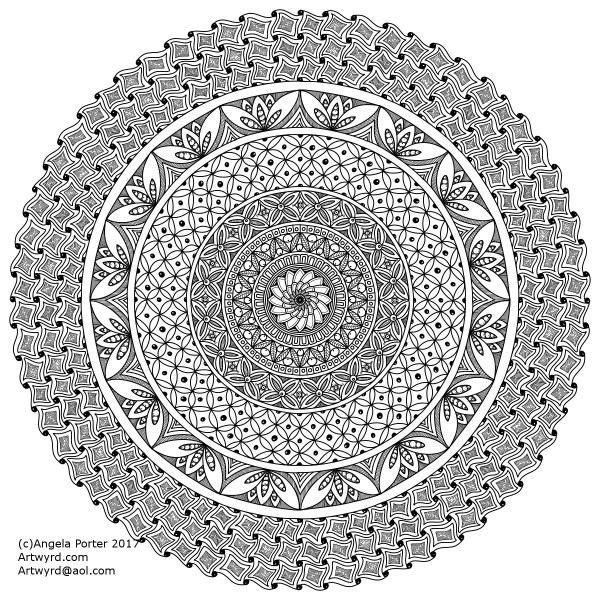
This morning, I’ve drawn the two mandalas above.  I used Autodesk Sketchbook Pro on my Microsoft Surface Book to do this.

I’m gradually exploring the features of Sketchbook Pro, and the more I use it, the more I like it, though making the transition from paper to digital drawing isn’t as easy as I thought it would be.  This is mainly because I find it hard to work at a detail level that doesn’t require a magnifying glass to see the detail or to add colour – particularly important when I’m doing work for colouring books.

This is partly because of the ability to zoom in so much on the artwork, and partly due to the screen size on my Surface Book being a little smaller than A4.

I have considered getting a Surface Studio, but that’s on hold until I’m sure I really want to go down the digital drawing route.  Having such a big screen is an alluring prospect, being able to work on the paper size at it’s actual size…but I’m still thinking about it.  Maybe when I find out my tax bill for the previous financial year I’ll make my mind up.

Now, these aren’t the first mandalas I’ve drawn using Sketchbook Pro.  In the past three or four days I’ve some some small ones (approx 3″x3″) to print out, colour and mount on blank greeting cards to be sold to raise money for Mia Chambers, Rainbow Warrior Princess to get her to America for experimental cancer treatment not available in the UK.

What I’ve always found tedious as well as a tad challenging mathematically, is setting out the angles and so on for a symmetrical mandala.  Sketchbook pro makes that easy for sure, as well as saving on the time in creating symmetry.

I’m still struggling with the idea that I may be ‘cheating’ by doing this.  However, I can logically accept that the tools available in Sketchbook Pro allow me to focus on my creativity far more.  Also, the ability to zoom in means I can add details and so on I couldn’t do easily when working on paper.

I have used mandala templates I’ve drawn on paper and scanned in Sketchbook pro to draw mandalas, as well as using sketched out designs so I can neaten up the sketch and add details (it saves erasing pencil lines and the mess and wrinkled paper and smudged in that can result).  I don’t really need to mention how easy it is to undo mistakes.

Certainly, the symmetry option makes creating these mandalas a lot quicker, and because I don’t strive for total perfection in the hand-drawn lines or added patterns, then even though the mandalas are drawn in a digital environment, they still have that feeling of being drawn by hand, which makes me happy – they’re still ‘perfectly imperfect’!

Of course, I’ve not really got to grips with colouring the designs in Sketchbook Pro, so printing them out and adding colour using a chosen medium is still my favoured way of working.  Also, I can add things like metallic highlights and sparkly gems to the mandalas, plenty of which appears on the cards I’ve made as well as the mandalas I’ve framed in order to raise money for little Mia.

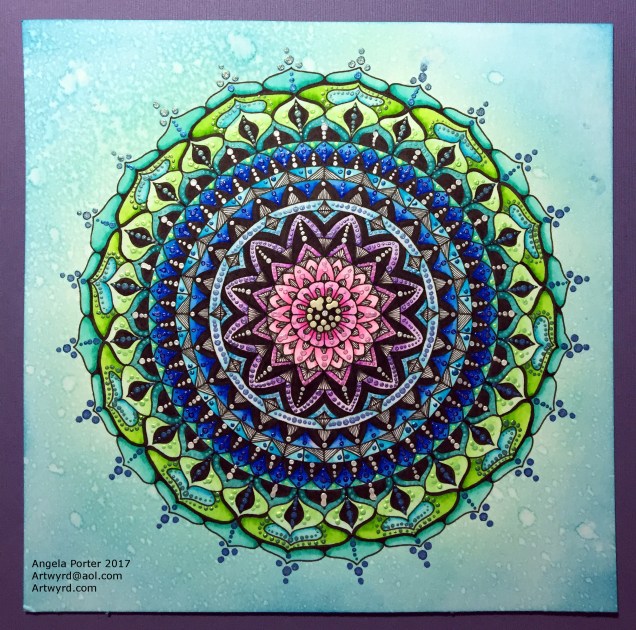
Today’s Mandala

DotMandala_9May2017_AngelaPorter

I’ve spent much of the day working on this, and it’s been a pleasure to create as it has combined many of my favourite techniques.

First, I coloured the background with Distress Inks, starting at the centre with a pale pink, follwed by a pale blue, a sea green and finally a blue with a hint of green around the edge.

A light spray of water and a dry and the sheet was ready to have the black line design drawn on it, once I’d put a pencil grid down.

Next, the colours in the various sections were intensified using Zig Clean Colour Real Brush Markers from Kuretake, along with a brush and water to fade the colours out.

Finally, all the dots were addded using pearlescent/iridescent watercolour paints.

I’ve smudged some dots, others insisted in running into each other, but I’m fairly pleased with the outcome.  As I’ve already said, I really enjoyed doing this one.