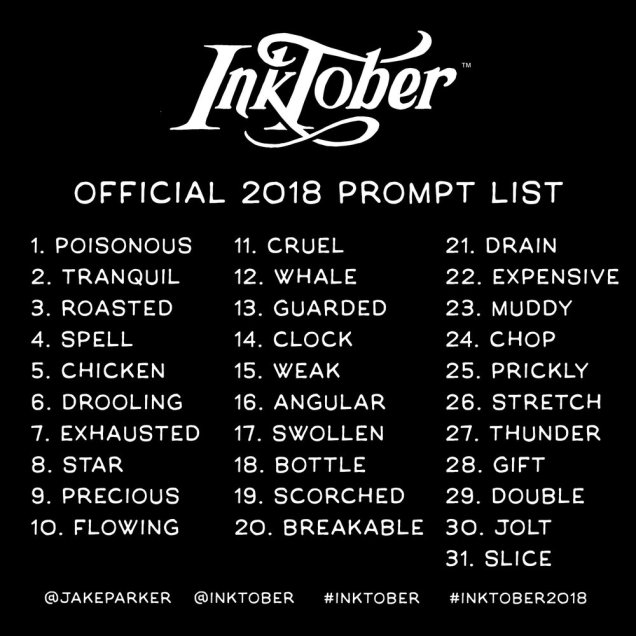
“Note: you can do it daily, or go the half-marathon route and post every other day, or just do the 5K and post once a week. What ever you decide, just be consistent with it. Inktober is about growing and improving and forming positive habits, so the more you’re consistent the better.
That’s it! Now go make something beautiful.
*Post it on any social media account you want or just post it on your refrigerator. The point is to share your art with someone. :)” – Inktober.com
Jeez, I’d forgotten it’s Inktober.
I’ve never taken part before, but this year I thought I would.
I’m going to limit the size of my art as I do have a book to complete before the end of the month. However, I think this may be a good way for me to practice drawing everyday as well as expanding my scope too.
After a week or so away from the drawing, I really need the practice too!
Q. Can I work digitally?
A: Yes. Initially, the challenge of Inktober was focused on traditional inking. Although learning how to ink digitally is a skill separate from traditional inking it is no less valid. If you want to improve your digital inking skills then doing Inktober digitally is a great way to challenge yourself. Just be cool to those who want to use traditional inks. And traditional inkers, be cool to those who are trying to improve with their digital inking. – Inktober.com
Great! I have a choice of what medium I use. I have good traditional skills and I’m working on drawing digitally, though for me that means using a surface pen on a surface studio screen in Autodesk Sketchbook Pro just like I would a traditional ink or marker pen on paper! I rarely use smoothing or predictive lines in my digital drawings, so really, it’s just a smudge-free, easily correctable way of working! Especially as the brush ‘pen’ I’ve created for myself leaves a line that is lumpy-bumpy on the edges, very similar to a Sakura Pigma Micron or Uniball Unipin on paper!
I don’t see why there’s so much fighting ‘twixt digital and traditional artists; each has their own skill set, each has their strengths and weaknesses, and each requires a lot of work to master and find your own artistic ‘voice’ in.
Yes, there are tools that can be used to make some tasks a bit easier – I do love to use the symmetry tool in Autodesk Sketchbook. But, then there are some that are really tricksy to use and I’m only just touching the surface of how I can get digital artiness to work for me the way I’d like my art too look.
So…. there’s a chance my Inktober challenges are likely to be a mix of digital and traditional depending on how I feel and where I think I need the practice.
Q. Can I do calligraphy?
A: Yes. If calligraphy, typography, lettering, etc is how you create your art, then by all means do that every day for Inktober. We’ve even heard of writers taking on the Inktober challenge and crafting a poem or short story every day that follow the prompts. – Inktober.com
That’s good to know as hand-lettering is something I like to use from time to time and also something I need to work on a lot more than I do at times. I do like to letter a word then add ‘decoration’ around it, so to match that ‘decoration’ with the meaning/feel of the word would be an interesting thing to do perhaps.
Q: Do I have to use the official prompt list?
A: No. The prompts are there to help spark your creativity. If you have another great idea, go for it! – Inktober.com
Uh-hu, that’s good to know! Some of the prompts don’t really speak to me. However, to produce a response to something that doesn’t initially inspire or interest me is one way to push the boundaries, isn’t it?
Also, it’s nice to see how people interpret a prompt in such different and individual ways.
Ok then, less of the words (unless it’s hand-lettering) and more of the drawing!


 Art is the Adventure